Add Me On

Tuesday, December 13, 2011

Top 10 Social Media Sites Around The World

After analysis and R&D on "social media topic" i found many social media sites are running and using by Internet users. The popularity of any social media sites varies by locations.

But here i would like to share only top 10 social media sites which is commonly used in different location/country.

The Top 10 Social Media Sites As Listed Below.

1# Facebook
2# Twitter
3# MySpace
4# Linkedin
5# Google Plus
6# Bebo
7# Orkut
8# Netlog
9# Ning
10# Friends Reunited


You May Follow Us @twitter or Find Us On Facebook


Monday, December 12, 2011

Popularity Of Free Classifieds In India

From Last 5-8 years Internet uses in India grows exponentially. While earlier Internet was used for chatting purpose only but now since 2-3 year Internet is popular for on-line shopping purpose. Now Internet users are more interested in on-line trading, on-line shopping, net banking, offer to sell or buy used products, SME'S interested in B2B trading etc.

In this article i want to discuss the uses of Classifieds In India. Classifieds site are the websites which is offering services to internet users to post Ads in particular city and category pages. The classifieds site offered mostly 2 type of services to users

1. Free Classified
2. Premium Classifieds.

Free Classifieds are the service provided by the classifieds site to user for free for this no charges & premium classifieds is the paid services provide to the users, Premium Classifieds is the premium position or premium listing given to the particular classifieds to get more relevant responses.

There are many classifieds site available on the web to post free ads or premium ads for Indian location like Delhi, Mumbai, Banglore, Pune, Lucknow, Noida etc. I have shared some sites below may be its beneficial for you. 

http://free-classifieds-india.com/
http://www.adsfairdeal.com/
http://www.clickindia.com/
http://www.olx.com/

Monday, October 17, 2011

Google Image Search "Search Images From Desktop & Web"

Google Image Search "Search Image From Desktop & Web:

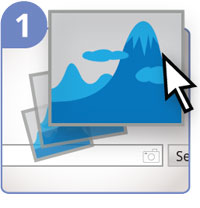
Now you can search images for same or similar images through google search by "Dragging and Dropping Images" into google images search box.

Recently, I (surprisingly) came to know that this feature in generally not know to most of people. Most of people still unknown to this features, thus i have sharing this wonderfull features with you...

Here i am sharing with you the ways, how you search an images and able to find similar or same images over he web.

#1: Drag and drop

  Drag and drop an image from the web or your computer into the search box on images.google.com. 

#2: Upload an image

On images.google.com, click the camera icon, then select “Upload an image.” Select the image you want to use to start your search. 

#3: Copy and paste the URL for an image 

Found an image on the web you’re curious about? Right-click the image to copy the URL. On images.google.com, click the camera icon, and “Paste image URL”.  

#4: Right-click an image on the web

To search by image even faster, download the Chrome extension or the Firefox extension. With the extension installed, simply right-click an image on the web to search Google with that image.

Resoource: http://www.google.com/insidesearch/searchbyimage.html


Anand Mohan